I deploy to production a lot. Really a lot. One of my apps can ship twenty or thirty times in a single day. Every one of those deploys carried a cost I only uncovered by digging through the error logs: for about one second, my app answered 502 Bad Gateway.
The cause was fairly mundane. The app is a Node.js SSR server (TanStack Start). On each release the process restarted, and during that restart nothing was listening on the port. nginx had nobody to forward to, so it returned a 502.
One second of downtime sounds negligible, until you do it thirty times a day, and until one of those seconds lands on a real user mid-payment.
The obvious answer, and why I skipped it
The classic remedy for never letting the backend go dark is to hand the job to a tool built for it. There’s a whole range of them.
You’ll find full orchestrators like Kubernetes, or self-hosted deploy tools like Dokku or Docker Swarm. They all do the same thing: they bring up the new version, wait for a health check, shift the traffic, then retire the old one.
Any of them would have done the job. But each one is another tool in my stack: something to install, learn, keep up to date and debug when it goes sideways.
So I decided to build the smallest possible thing that guarantees the one property I actually wanted: the backend is never fully down during a deploy.
The shape of the solution
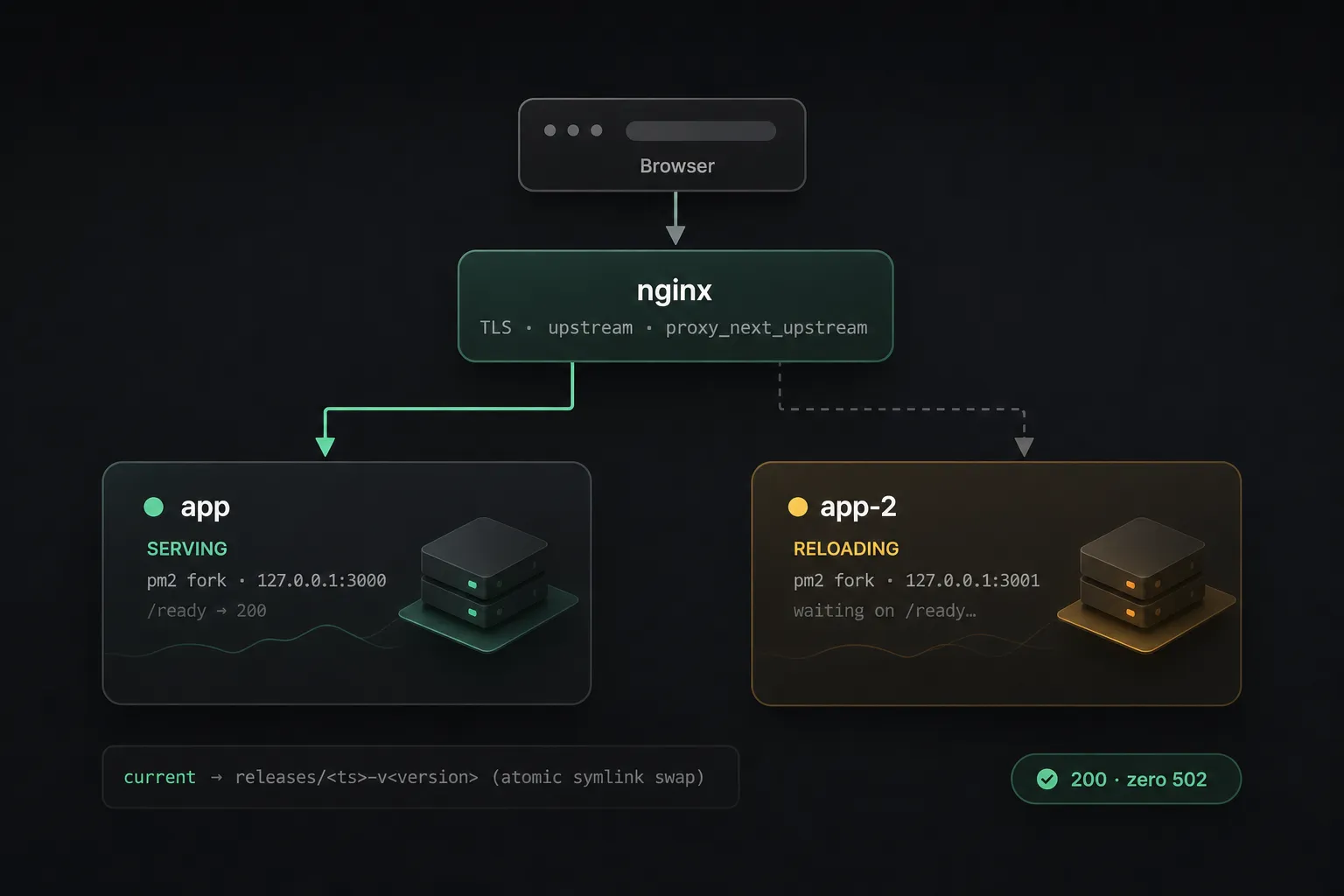
The whole idea fits in one sentence: run two copies of the app, put nginx in front, and reload them one at a time.
Browser
  │
  ▼
nginx  (TLS, proxy_next_upstream)
  │
  ▼
upstream { 127.0.0.1:3000 ; 127.0.0.1:3001 }
   │              │
   ▼              ▼
PM2 fork :3000   PM2 fork :3001
If instance A is restarting, instance B still answers, and nginx routes around the one that’s down. Reload A, wait until it’s truly ready, then reload B.
Two instances, hard-coded ports
PM2 runs the app as two plain fork processes, each pinned to its own port:
const sharedConfig = {
  cwd: '/var/www/project',
  script: '/var/www/project/current/.output/server/index.mjs',
  exec_mode: 'fork',
  kill_timeout: 5000,
};

module.exports = {
  apps: [
    { ...sharedConfig, name: 'project', env: { PORT: 3000 } },
    { ...sharedConfig, name: 'project-2', env: { PORT: 3001 } },
  ],
};
nginx routes around the one that’s down
The upstream lists both instances, and the proxy is told to retry the other one when one refuses a connection:
upstream project_app {
  server 127.0.0.1:3000 max_fails=1 fail_timeout=2s;
  server 127.0.0.1:3001 max_fails=1 fail_timeout=2s;
}

# in location / and @app
proxy_pass http://project_app;
proxy_next_upstream error timeout non_idempotent;
proxy_next_upstream_tries 2;
proxy_next_upstream_timeout 5s;
Knowing when an instance is ready
The tricky part of having to reload one instance at a time is knowing when an instance is really back.
So each instance exposes a /ready endpoint that runs a harmless query against the database and only returns 200 once it can truly serve. The reload script polls that:
for pair in $pairs; do
  id="${pair%%:*}"; port="${pair##*:}"

  pm2 reload "$id"

  ready=0
  for _ in $(seq 1 20); do
    if curl -sf -o /dev/null "http://127.0.0.1:${port}/ready"; then
      ready=1; break
    fi
    sleep 1
  done

  if [ "$ready" -ne 1 ]; then
    echo "ERROR: instance $id failed readiness; aborting deploy"
    exit 1   # the other instance keeps serving via nginx
  fi

  sleep 3    # let nginx clear its fail_timeout blacklist
done
Two details make this reliable. The script reloads by pm_id, one at a time, so the other instance is never touched.
And on a readiness failure, it aborts. The bad release usually crash-loops and never binds its port, so nginx keeps every request on the healthy instance while my CI run goes red and alerts me. Production stays up on the last good release.
Atomic swap
The last part is making sure the live process never reads from a directory that’s being rebuilt. Each deploy builds into a fresh releases/<timestamp>-v<version>/ folder, then flips a symlink in a single atomic rename:
ln -sfn "$NEW_RELEASE" "$APP_ROOT/.current.tmp"
mv -Tf "$APP_ROOT/.current.tmp" "$APP_ROOT/current"

bash "$APP_ROOT/scripts/reload-app.sh"
Flip the link, run the rolling deploy, done. As a bonus, keeping the old releases’ content assets in a dedicated pool means browsers still on the old version of the site never hit a 404 for a chunk a recent build deleted (but that’s a story for another article 😉).
Did it work?
Yes, and I made sure twice over rather than just hoping. I ran a curl against the app every 0.2 seconds during a full deploy. Every response was a 200. Zero 502.
The whole system is four versioned shell scripts, one nginx config block, and a two-line PM2 file. I can read all of it in one sitting.
Conclusion?
A few years ago, the rational choice would have been to reach for an open-source tool. Writing the bespoke version myself would have cost me days I didn’t have, in a domain I only half-knew.
In the agentic era, building your own small tool is nearly free.
And that matters, beyond convenience. Every dependency you pull in is code you didn’t write, maintained by people you don’t know, on a release cadence you don’t control. And lately, we’re reminded almost every week how that ends: a compromised package, a supply-chain injection, and so on.
A general-purpose tool has to serve everyone, so it carries a thousand features that aren’t yours. A small thing you wrote yourself does exactly the same job with a surface you can audit in no time.
Owning your tools means owning your time.